
Handcent Next SMS messenger
HandcentCommunication
4.425.73K Reviews
- Version
- Varies With Device
- Installs
- 1.00M
- Age Rating
- Everyone
Screenshots
Our Review of Handcent Next SMS messenger
 Analysis by Appyee
Handcent Next SMS makes the most sense when I think of it as a hands-on alternative to the texting app that came with a phone. Its appeal is not simply sending a message; it is having more say over how conversations look and how routine texts are handled. That extra control can be useful if you spend a lot of time in SMS and MMS, but it also means there are more options to explore than in a stripped-back default app.
What happens when a message depends on the network
Texting feels effortless when a message goes through immediately, but the experience changes when reception is weak or a picture takes longer to send. With any SMS app, delivery still depends on the mobile network and the kind of message being sent. I would treat Handcent as the place to compose and manage conversations, not as a way around poor coverage. A more elaborate interface cannot make a delayed network response disappear.
That distinction matters most with MMS and group conversations. A short text is usually a lighter task than sending a photo or coordinating a lively group thread, and the latter can be more sensitive to connection quality. If something stalls, I would first check the signal and whether the message is still pending before composing it again. Sending a duplicate while the first attempt is unresolved can confuse the conversation.
Useful in the middle of an ordinary day
I can see the app fitting someone who relies on texting for small pieces of daily coordination: confirming a pickup, sharing a photo with family, or setting up a group plan. In a realistic routine, I might schedule a birthday greeting during a quiet moment, then use a group message later to settle where everyone is meeting. Those are modest tasks, but they are exactly where a flexible SMS tool can earn a place on the home screen.
The key convenience is keeping routine communication in a familiar text-based flow. You do not have to persuade every contact to install a separate chat service just to send a basic message. At the same time, SMS and MMS should not be confused with internet messaging: availability, delivery, and any applicable network charges depend on your carrier and plan. I would check those details before making media messaging a regular habit.
When a message fails, keep the recovery simple
When a text does not appear to send, I would avoid tapping repeatedly. First, look at the conversation for its current send state, then check reception and try again only when it is clear the original attempt did not go through. For a photo or other MMS, it is also sensible to confirm that mobile data and the carrier’s messaging service are available. That troubleshooting is not unique to Handcent, but it is a useful habit with any SMS client.
There is a practical trade-off here: customization can make the app feel more personal, but a familiar default messenger may be easier to diagnose if something behaves unexpectedly. If I were helping a less technical relative, I would keep the appearance simple and make sure they know which app is handling texts. Switching messaging apps without checking the default can lead to uncertainty about where new conversations will appear.
Keeping media use deliberate
Photos, videos, audio messages, and stickers make conversations more expressive, but they are not always the best choice on a limited mobile plan or a slow connection. I would use plain text when the detail is small and save larger media for a reliable connection, especially when sending it to a group. That keeps communication practical rather than turning every update into a data-heavy exchange.
It is also worth thinking about the recipient. A sticker or image can add warmth, but it may be less useful than a clear sentence when someone is busy or has limited connectivity. Handcent’s range of expressive options is a nice extra, not a reason to use media for every message. I would choose the format based on what the other person needs to receive.
Who benefits from the extra control
I would recommend Handcent Next SMS to Android users who prefer conventional texting but want more control over the visual style and tools around it. It is especially appealing to people who enjoy adjusting themes, fonts, and conversation bubbles instead of accepting one fixed look. The app is free, is developed by Handcent, and has a 4.5 average from around 75,000 ratings, which gives a prospective user a useful sense of its audience without telling them whether its particular style will suit them.
On the other hand, anyone who wants a minimal messenger with almost nothing to configure may be happier with the phone’s built-in app. People whose conversations mostly happen in internet-based services may also gain little from changing their SMS client. Handcent is most relevant when ordinary SMS and MMS remain part of your daily routine, not when you are looking for a replacement for every kind of online chat.
How it compares with the usual choices
The default messaging app is the easiest comparison: it tends to be the natural starting point and may feel more predictable, while Handcent emphasizes personalization and a broader set of messaging options. Dedicated internet messengers are a different comparison altogether. They can be better for contacts who already use the same service and want its particular online features, whereas an SMS app is useful for reaching people through standard phone-number-based messaging.
That does not make one approach universally better. I would keep the default option if reliability and simplicity matter more than appearance, and choose Handcent if I genuinely want to tailor the texting experience. Before switching, I would check that the app is suitable for the Android version on my phone: its stated minimum is Android 6.0. It is rated for Everyone, has more than one million installs, and offers optional in-app purchases ranging from about $0.49 to $44.99 per item, so I would review any purchase prompt rather than assume every extra is included for free.
Some questions are worth settling before making it the everyday messenger. Can I use it for group messages and media? Yes, those are part of its SMS/MMS-oriented feature set, though successful delivery still relies on network conditions and carrier support. Do I have to pay to try it? The app is free, while optional in-app purchases are available. Is it a good fit for someone who dislikes setup? Probably not as much as a simpler default app, because its attraction includes options that invite adjustment.
I would also be careful about treating privacy claims as a substitute for checking the details that matter to you. The published app description highlights private texting, but I would not assume every type of message has identical protections or that SMS behaves like an encrypted internet chat. If sensitive communication is your priority, compare the specific protections offered by the service you plan to use and the type of message being sent.
Handcent SMS is a communication app, and its history stretches back to a June 24, 2015 release. That long-standing focus on text messaging helps explain its appeal to people who still want a dedicated SMS experience, while the Android 6.0 minimum gives a clear compatibility check to make before installing. For iOS users, I would verify the current platform availability and behavior before planning a switch, since the experience of a messaging app can differ between operating systems.
For day-to-day use, I would start with a restrained setup: choose a readable theme, keep the conversation list easy to scan, and try one or two extras such as scheduled messages before changing everything at once. That makes it easier to tell whether the extra controls genuinely help. If I later find that visual tweaks slow me down or make conversations harder to read, I would simplify them rather than treating customization as a goal in itself.
There is also a useful distinction between tailoring an app and consolidating every channel in one place. Handcent can make SMS feel more personal, but it should not be assumed to combine email and social-media conversations; I would choose it for texting rather than expect it to replace every communication tool. Used with that expectation, its strengths are easier to judge: flexible presentation and familiar phone-number messaging, balanced against network dependence and more settings than some people need.
For readers who want a dedicated text messenger rather than another account-based chat service, that trade-off may be worthwhile. I would try it if I regularly send SMS or MMS and enjoy shaping the tools I use. If I rarely text, prefer a bare-minimum interface, or depend mainly on a separate online messenger, I would stay with the app that already fits those habits.
Have you ever felt like your standard messaging app just doesn’t cut it? Let me introduce you to Handcent Next SMS. It's like the Swiss Army knife of messaging apps, and I’ve been diving deep into its world to see what it’s all about. Buckle up, because this app is packed with features that might just make it your new favorite way to chat.
First Impressions: More Than Just Messaging
From the get-go, Handcent Next SMS boasts a sleek and intuitive interface. It’s one of those apps where you don’t need a manual to figure things out. The navigation is smooth, and I was pleasantly surprised by the level of customization available. If you’re like me and love tweaking things to make them just right, this app is right up your alley.
Customization Galore
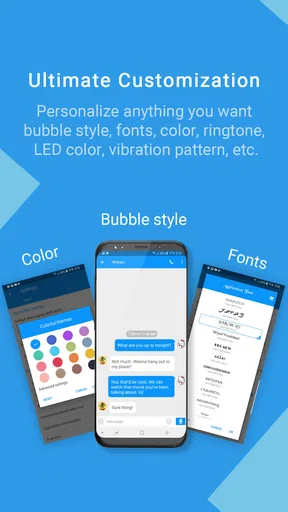
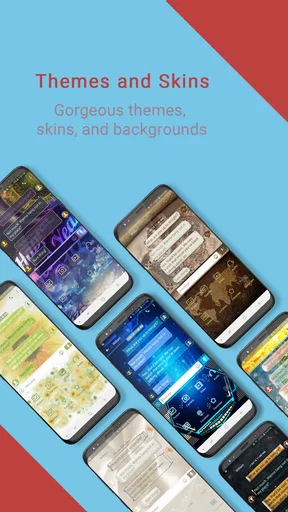
One of the standout features for me was the customization options. You can change themes, fonts, and even the conversation bubbles. I spent a good chunk of time playing around with the settings, and it felt like I was designing my own personal messaging app. The themes range from minimalist to vibrant, so there’s something for every mood and style.
Privacy and Security: A Safe Bet
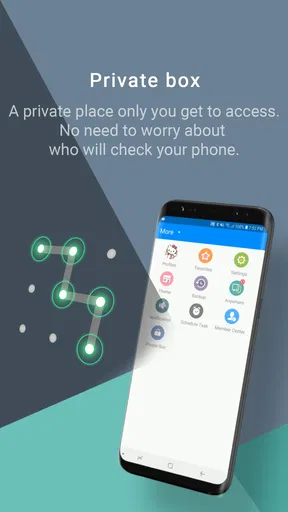
In today’s world, privacy is key. Handcent Next SMS doesn’t disappoint in this department. It offers end-to-end encryption, ensuring that your messages are for your eyes only. Plus, there’s a nifty feature called Handcent Private Box, which lets you keep certain conversations hidden from prying eyes. I tested it out, and it works like a charm.
Features That Wow
Let’s talk features, because Handcent Next SMS is not shy about them. From scheduled messages to group chats, this app covers all the basics and then some. I was particularly impressed with the support for multimedia messages. Sending videos, photos, and even audio messages was a breeze.
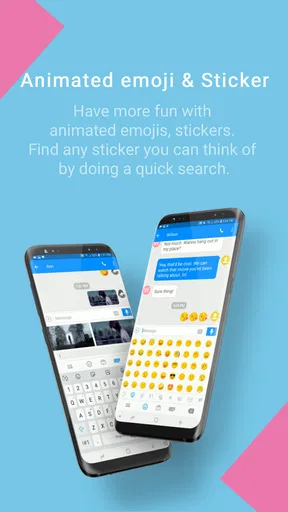
And if you’re someone who loves emojis, you’re in luck! The app offers a vast array of emojis and stickers to spice up your conversations. I found myself using them more than I expected, adding a playful touch to my chats.
Integration and Compatibility
Handcent Next SMS integrates seamlessly with other apps. Whether it’s syncing with your email or connecting with social media, the app makes it easy to have all your communication in one place. I appreciated how it played well with my Android device, but it’s also available for iOS users, making it a versatile option for everyone.
Why You Might Want to Make the Switch
If you’re tired of your current messaging app’s limitations, Handcent Next SMS offers a refreshing alternative. I found the ability to schedule messages particularly useful. Imagine never forgetting a birthday message again!
Plus, the app’s support for multiple languages makes it accessible to a broader audience. It’s clear that the developers put a lot of thought into making this app as inclusive as possible.
Final Thoughts: Is It Worth It?
So, is Handcent Next SMS worth the download? In my opinion, absolutely. It’s more than just a messaging app; it’s a complete communication hub. Whether you’re looking for customization, security, or just a better way to connect with friends and family, this app delivers.
And the best part? It’s free to download with optional in-app purchases. So, why not give it a shot and see if it becomes your new go-to messaging app?
Verdict
Strengths of Handcent Next SMS messenger
- Highly customizable themes and fonts.
- Supports multiple languages seamlessly.
- Effective spam filter feature included.
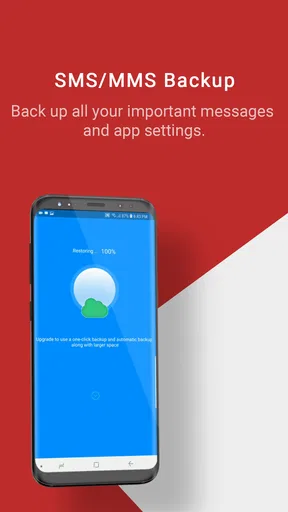
- Backup and restore options available.
- Group messaging is smooth and reliable.
Limitations of Handcent Next SMS messenger
- Ad-supported unless premium version.
- Some features are behind a paywall.
- Can be resource-intensive on older devices.
- Occasional delays in message delivery.
- Interface can be overwhelming for new users.
Similar Picks in This Category
View All
Google Messages
Google LLC4.6

Gmail
Google LLC4.1

Google Meet
Google LLC4.4

Google Chrome
Google LLC4.1

WhatsApp Messenger
WhatsApp LLC4.6

Carrier Services
Google LLC4.2
Frequently Asked Questions
What features does Handcent Next SMS offer?
Handcent Next SMS offers a variety of features, including customizable themes, private messaging, SMS encryption, and group chat capabilities. Additionally, it supports multimedia messaging, quick replies, and has a built-in spell checker. Users can also schedule messages and use cloud backup to save conversations securely.
Is Handcent Next SMS secure for private messaging?
Yes, Handcent Next SMS provides enhanced security features such as end-to-end encryption for private messages. It also includes a privacy box feature that allows users to hide messages from specific contacts, ensuring that sensitive conversations remain confidential and accessible only to the intended recipients.
Can I use Handcent Next SMS across multiple devices?
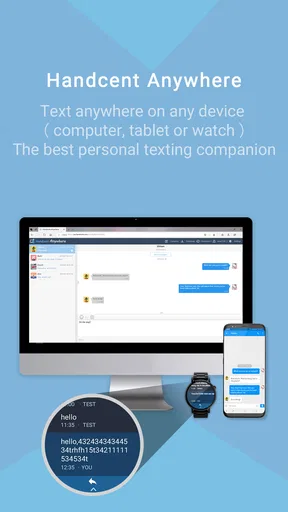
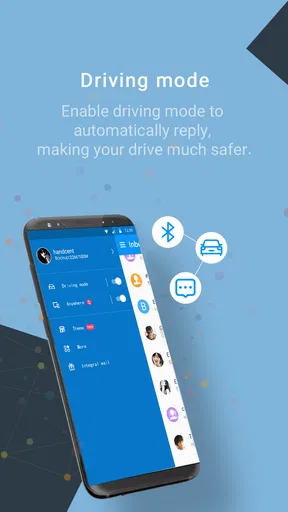
Handcent Next SMS supports cross-device synchronization through its Handcent Anywhere service. This feature allows users to send and receive messages from tablets or computers, ensuring seamless communication across devices without missing any important messages.
How customizable is the Handcent Next SMS interface?
The interface of Handcent Next SMS is highly customizable, offering a wide range of themes, fonts, and color options. Users can personalize their messaging experience by adjusting the layout and appearance to match their preferences, making it one of the most versatile messaging apps available.
Does Handcent Next SMS support multimedia messaging?
Yes, Handcent Next SMS fully supports multimedia messaging (MMS), allowing users to send images, videos, audio files, and even location data. The app ensures that these multimedia messages are delivered quickly and efficiently, enhancing the quality of communication between users.
